Monthly income & expense
A clean summary of all income (donations, grants, hundi) and all expenses for any month. Formatted for your monthly trustee meeting or committee review.
Generate audit-ready financial reports in one click. Monthly income-expense statements, donor-wise reports, trustee contribution summaries and category-wise breakdowns — always up to date, always accurate.
Export to PDF — One Click
Related: 80G receipts · Trustee tracking · Expense vouchers · Pricing · Temple trust audit checklist
Built specifically for the reporting requirements of Indian temples, trusts and NGOs — not a generic accounting tool.
A clean summary of all income (donations, grants, hundi) and all expenses for any month. Formatted for your monthly trustee meeting or committee review.
See every donor's total contributions for the year with receipt numbers. Essential for Form 10BD filing and responding to donor queries about their 80G records.
Each trustee's total contributions for the year broken down by date. Print for the AGM or share with your auditor as part of the annual accounts package.
Total spending by category — puja samagri, salaries, festival expenses, maintenance and more. Instantly see which categories are over or under budget.
A complete annual income-expense statement with opening and closing balances, formatted for submission to your CA and for filing with the trust registrar.
Use: Monthly income & expense report
Print the monthly summary and walk your committee through income vs spending in 5 minutes. No spreadsheet. No confusion.
Use: Donor-wise report + receipt reprint
Find the donor, see all their donations, reprint their 80G receipt and send on WhatsApp — all in under 2 minutes.
Use: Annual audit summary + all supporting reports
Hand your CA a complete, organised package: income-expense statement, donor list with PANs, expense vouchers by category. Audit prep time cut from days to hours.
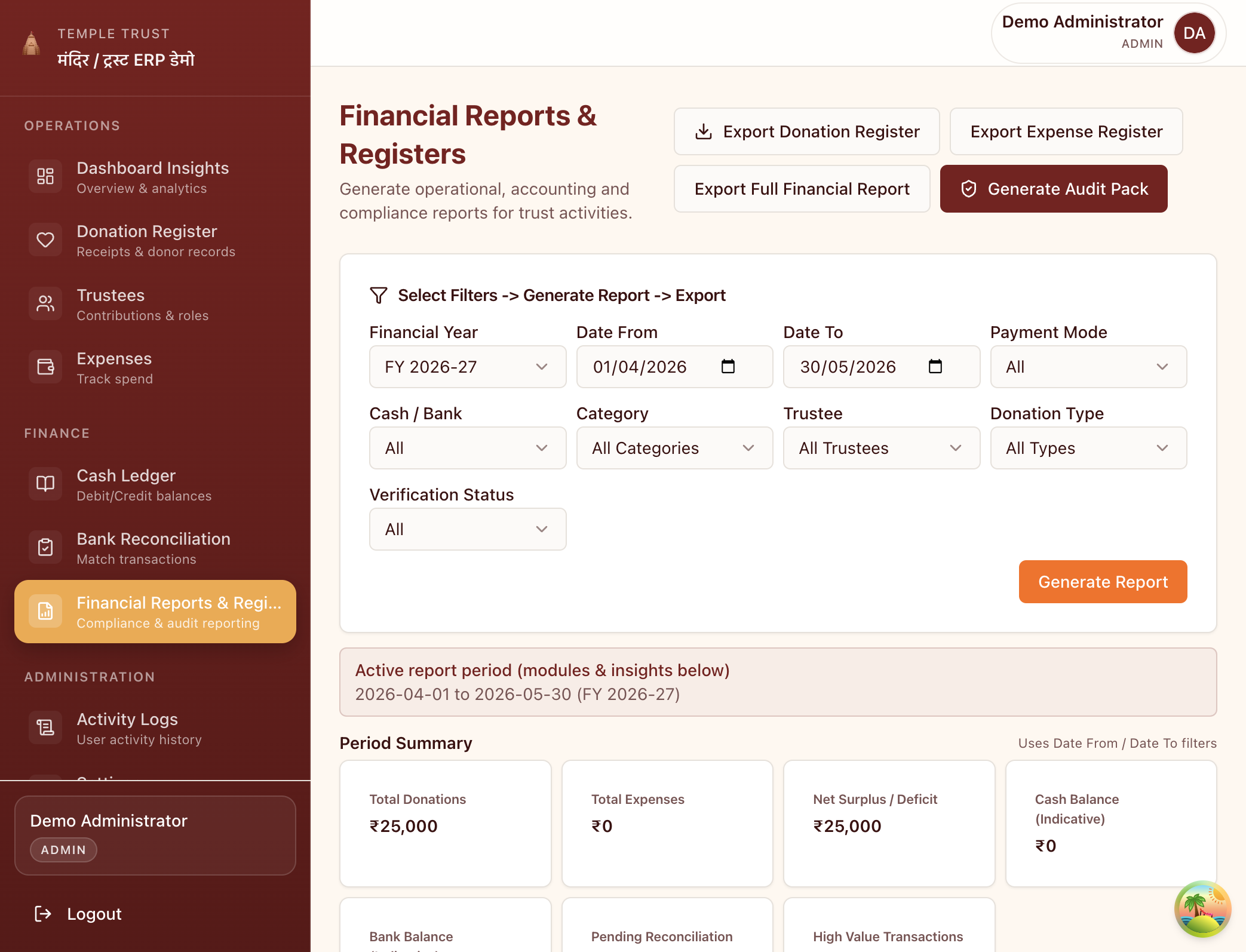
Filter by financial year, date range, trustee or category. Export donation registers, expense registers and a full audit pack in seconds.
Yes. Every report in Sanstha ERP can be downloaded as a PDF with a single click. The PDF is formatted for printing and includes your institution's name, the report period, and all the data in a clean, audit-friendly layout.
Yes. All reports support custom date ranges. Select any start and end date to see income and expenses for that specific period. This is especially useful for festival-specific reporting.
Yes. The Annual Audit Summary report generates a complete income and expenditure statement with opening balance, all income by category, all expenses by category and closing balance. This is the standard format accepted by most chartered accountants for trust audits.
Yes. If you have tagged income and expenses by project or festival category, you can filter all reports to show only that category. This gives you a clean profit/loss view for each event or programme.
Yes. The reports dashboard works on any mobile browser. You can view, filter and download reports on your phone — useful for checking numbers before a trustee meeting or sending a quick summary to a committee member.
No more waiting for your CA to prepare reports. Sanstha ERP generates them instantly.